
Baby Daybook - Newborn Tracker
BaltapisParenting
4.77.46K Reviews
- Version
- Varies With Device
- Installs
- 1.00M
- Age Rating
- Everyone
Screenshots
Our Review of Baby Daybook - Newborn Tracker
 Analysis by Appyee
When I first bring a newborn home, the days can blur together: a feed, a nap, a diaper change, then another feed before I’m sure what happened last. Baby Daybook - Newborn Tracker is designed to give those small, easily forgotten details a place to go. It’s a parenting app from Baltapis, and its focus is practical: recording everyday care and making it easier to look back at the pattern.
What to expect from a newborn tracker
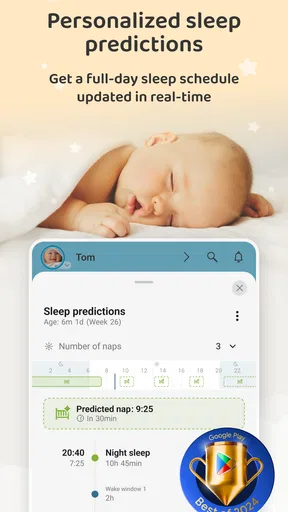
I’d think of Baby Daybook less as a strict schedule and more as a shared notebook that can help me notice what has happened. It covers familiar parts of infant care, including sleep, feeding, diapers and growth, with personalized sleep predictions among its central ideas. That can be useful when I’m trying to understand a routine, but I wouldn’t treat a prediction as a promise or a substitute for responding to the baby in front of me.
The app has a 4.8 average from around 67,000 ratings, and it has been installed over a million times. Those figures suggest that many families find this kind of logging worthwhile, though they can’t tell me whether the workflow will suit my household. Baby Daybook is free to start, with in-app purchases ranging from $1.99 to $99.99 per item. It is rated for Everyone, which is a sensible fit for a family utility rather than a game or social app.
Getting Started with Baby Daybook
Once you download the Baby Daybook - Newborn Tracker, you’ll find a straightforward setup that doesn’t require a tech degree to navigate. It’s like the app was designed with sleep-deprived parents in mind! Just input your baby’s details, and you’re set to start tracking all those essential activities.
The interface is clean and intuitive. You’ll find different sections for feeding, diaper changes, sleep, and even tummy time. You can customize these sections to fit your baby’s specific needs, which is a nice touch. I mean, who doesn’t love a bit of personalization?
Make the first entry count
For a first-time user, I’d keep setup modest. Add only the details that are useful to your family, then record the next care activity rather than trying to reconstruct every event from the previous day. A clean starting point makes later entries easier to interpret. If you’re unsure what to track, begin with the things you most often find yourself asking: when the last feed happened, how long the baby slept, or whether a diaper change was recent.
That first entry is the app’s simplest meaningful success: you have one reliable note to check later. It can be especially reassuring overnight, when asking another caregiver what happened may be easier than relying on a tired memory. I’d also agree with everyone in the household on a simple routine for logging events. If one person records a feed immediately and another waits until later, the timeline can become less dependable even when both are trying to help.
Tracking Made Easy
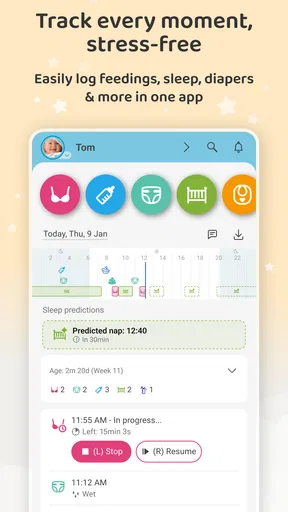
One of the standout features of this app is how easy it makes tracking your baby’s daily routine. With just a few taps, you can log feedings, track sleep patterns, and record diaper changes. The app even lets you add notes, so if you notice something unusual, you can jot it down for future reference. It’s like having a snapshot of your baby’s day right at your fingertips!
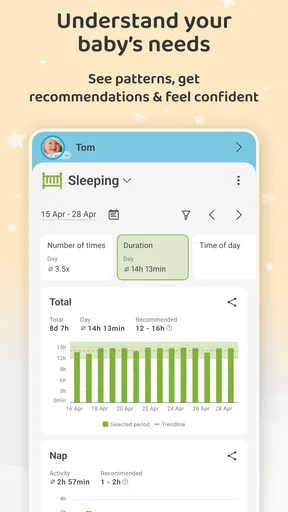
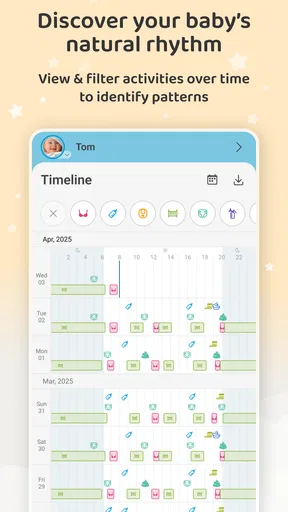
And hey, if you’re a fan of charts and graphs, you’re in luck. The app provides visual representations of your tracked data, making it easier to spot trends and adjust your baby’s schedule as needed. It’s like having your own personal baby data analyst!
Use the record as a prompt, not a rulebook
The most helpful way I’d use those charts is to look for questions worth asking, not to chase a perfect pattern. For example, if several days of entries seem to show a change in sleep, I can bring that observation to a conversation with a health professional instead of trying to diagnose the cause from a graph. A log can make a discussion more concrete, but it cannot explain every variation or tell me what is medically important.
There’s also a practical trade-off: tracking is most valuable when it is consistent, but newborn care is exactly when spare attention is scarce. I’d log the details that support a real decision or reduce repeated questions, and skip entries that turn the app into another task. If a note is important, keep it short and specific; a quick observation is more useful later than a vague label such as “rough night.”
Syncing and Sharing
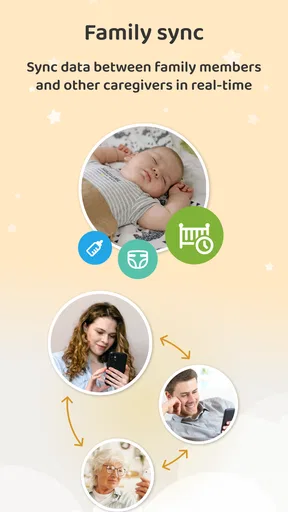
Now, you’re probably wondering about sharing this data with your partner or caregiver. Well, Baby Daybook has you covered. The app allows real-time syncing across devices, so everyone can stay in the loop. This is particularly handy if you’ve got a nanny or a babysitter, as it ensures consistency in your baby’s care routine.
Plus, the app offers the option to export data, which can be useful for pediatrician visits. Imagine walking into the doctor’s office with all the info neatly organized and ready to go. Talk about being prepared!
A smoother handoff between caregivers
A realistic use case is a parent taking the early shift while another gets some rest. Before handing over, the first caregiver can leave the day’s entries in one place; the next person can check the latest feed or sleep record instead of waking someone to ask. The same approach can help when a relative babysits: a brief look at the recent timeline may answer routine questions, while a written conversation about the baby’s needs still matters.
Sharing is most useful when everyone treats the log as a common record rather than a scorecard. I’d avoid using it to judge who did more or to expect every moment to be documented. A caregiver who is busy soothing a baby should prioritize care over tapping a screen. The app can help a handoff, but it should never make a family feel that a missed entry means someone has failed.
Extra Features Worth Mentioning
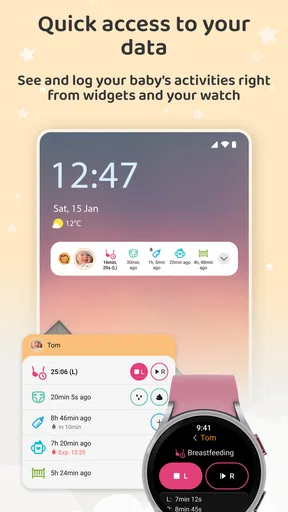
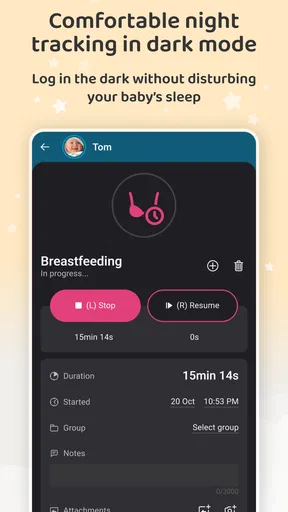
Aside from the basics, Baby Daybook throws in a few extras that add value to the overall experience. There’s a built-in timer for nursing sessions, which is a godsend for breastfeeding moms. You can also set reminders for upcoming feedings or naps, which is a lifesaver during those sleepless nights.
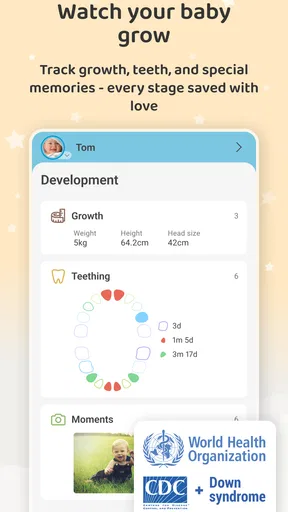
For those who love to keep memories, there’s an option to attach photos to specific entries. It’s a sweet way to document milestones and look back at how much your little one has grown.
Where it fits among the alternatives
Compared with a paper notebook, a phone-based tracker is easier to check when another caregiver needs the latest information, and the charts can make repeated entries easier to review. A notebook, on the other hand, never asks me to keep a phone nearby and can feel simpler if I only want a few handwritten notes. Compared with a general notes app, Baby Daybook’s dedicated categories and tracking tools are more suited to recurring baby-care details, while a plain note may be better for families who want maximum flexibility and very little structure.
I’d choose the dedicated tracker if I expect to share care, want a searchable record of everyday routines, or find that repeated questions are adding stress. I’d skip it if tracking itself feels intrusive, if I prefer pen and paper, or if I only need occasional reminders. The best method is the one the caregivers can maintain without distracting them from the baby.
Cost, commitment, and a sensible next step
Because the app is free to download and has optional in-app purchases, I’d try the basic routine before spending money. The listed purchase range is broad, so it’s worth checking what an offered item includes and whether it solves a problem I actually have. I wouldn’t pay simply because I feel I ought to track everything; the core test is whether the app makes daily care clearer or handoffs easier.
Baby Daybook was released on May 4, 2014, and is developed by Baltapis. Its age rating is Everyone. These details may help a family understand what kind of app it is, but the more important question is whether its approach matches the way that family shares care and handles information.
Final Thoughts
In the chaotic yet beautiful world of parenthood, having an app like Baby Daybook feels like a little slice of order amidst the chaos. It’s user-friendly, highly functional, and offers features that genuinely make a difference in managing your baby’s daily routine.
Sure, no app can fully replace the instincts and love of a parent, but this one certainly helps lighten the load. Whether you’re a first-time parent or a seasoned pro, the Baby Daybook - Newborn Tracker offers a convenient way to keep track of your baby’s needs, ensuring nothing falls through the cracks.
So, if you’re looking for a trusty sidekick in your parenting adventure, give Baby Daybook a try. It might just become your new best friend in the nursery!
Verdict
Strengths of Baby Daybook - Newborn Tracker
- Intuitive interface for easy tracking.
- Customizable notifications for reminders.
- Supports multiple caregivers syncing.
- Includes a growth tracker feature.
- Available in multiple languages.
Limitations of Baby Daybook - Newborn Tracker
- Ads can be intrusive in free version.
- Limited features without premium upgrade.
- Syncing issues reported occasionally.
- No offline mode for data entry.
- Requires frequent updates for bug fixes.
Similar Picks in This Category
View All
Family Space
Motorola Mobility LLC.3.9

شرطة الأطفال - مكالمة وهمية
Oub Apps4.1

Findmykids: Parental Control
LETEM LTD4.6

Pregnancy + | Tracker App
Philips Electronics UK Limited4.8

Policía de niños - para padres
Kids police4.7

Pregnancy App
Amila4.9
Frequently Asked Questions
What features does Baby Daybook offer for tracking my newborn's activities?
Baby Daybook provides comprehensive tracking for feedings, diaper changes, sleep patterns, and growth milestones. The app allows you to log activities with ease, set reminders, and generate detailed reports. It also supports multiple caregivers, ensuring that everyone involved in your baby's care is informed and up-to-date.
Is Baby Daybook user-friendly for first-time parents?
Yes, Baby Daybook is designed with first-time parents in mind. The intuitive interface makes it easy to navigate, even for those who are new to parenting apps. The setup process is straightforward, allowing parents to start tracking their baby’s activities without any hassle. Additionally, helpful tutorials and tips are available to guide new users.
Can I share my baby's activity data with other caregivers?
Absolutely. Baby Daybook supports data sharing among multiple caregivers. You can easily synchronize the app across different devices, enabling seamless communication between parents, babysitters, and family members. This feature ensures everyone is on the same page regarding the baby's schedule and needs.
How does Baby Daybook help with sleep tracking?
Baby Daybook offers detailed sleep tracking features, allowing you to log sleep sessions and monitor your baby's sleep patterns. You can set alarms and reminders to help establish a consistent sleep routine. The app also provides insights into your baby’s sleep trends, helping you make informed decisions to improve sleep quality.
Is Baby Daybook available on both Android and iOS devices?
Yes, Baby Daybook is available for download on both Android and iOS platforms. You can find it on the Google Play Store and the Apple App Store. The app ensures cross-platform compatibility, so you can access your baby’s data from any device, making it convenient for parents using different operating systems.
